

Table of Contents
TogglePrefer a quick visual guide?
If you want to make a website for your business, blog, or online store, you’ll definitely have one question in mind:
👉 WordPress vs Custom Website — which one is better?
And to be honest, it’s a very real mix-up.
You might have already seen some YouTube videos, read some blogs, or even talked to a developer and still not been sure. Some people say “WordPress is the best,” while others say “Custom website is more powerful.”
What should you pick?
First, I want to be honest with you.
Don’t worry; you’re not the only one.
This is a question that almost every new business owner, beginner, or even someone who is starting an online store has.
I have seen people do the following:
Don’t waste money on custom websites that you don’t need. 😓
Or pick WordPress and use it the wrong way 😬
And in both cases, they wish they hadn’t done it.
That’s why it’s so important to make the right choice from the start.
The Truth That No One Tells You
This is the simple truth:
👉 There is no one “best” choice for everyone.
What you choose depends on:
- Your goal (blog, business, app, eCommerce)
- Your money
- Your knowledge of technology
- And how quickly you want to get going 🚀
🎯 Let’s Make It Personal (for You)
Before we go any further, think about these things:
- Do you want a website right away without having to code?
- Do you have a small budget?
- Do you want to handle everything on your own?
👉 If you said YES, you’re already leaning toward WordPress.
Or…
- Do you need something one-of-a-kind and very personalized?
- Are you making a complicated platform or system?
- Do you have a good budget and help from developers?
👉 A custom website might be better for you then.
Here’s a Simple Example to Help You Understand
Let me make it very clear:
🏠 WordPress = Ready-Made House
- You move in fast
- Everything is already planned out.
- All you have to do is decorate it.
✔ Fast
✔ Affordable
✔ Easy
Custom Website = Make Your Own Home
- You make everything from the ground up.
- Takes time
- Costs more
✔ Unique
✔ Powerful
✔ Fully controlled Completely under control
🚀 What This Guide Will Teach You
I’m going to help you understand the following in the next sections:
✔ What the real difference is between WordPress vs Custom Website
✔ Which one is better for you
✔ Where you can save money
✔ Where you should spend more money
✔ And most importantly, how to avoid making expensive mistakes
💬 My Promise to You
I won’t confuse you with:
❌ Technical jargon
❌ Complicated coding terms
❌ Unnecessary theory
Instead, I’ll explain everything like a friend would, step by step.
So, take a deep breath…
By the end of this guide, you’ll know exactly what the difference is between
WordPress vs Custom Website — and which one is perfect for YOU.
💡 What is WordPress?
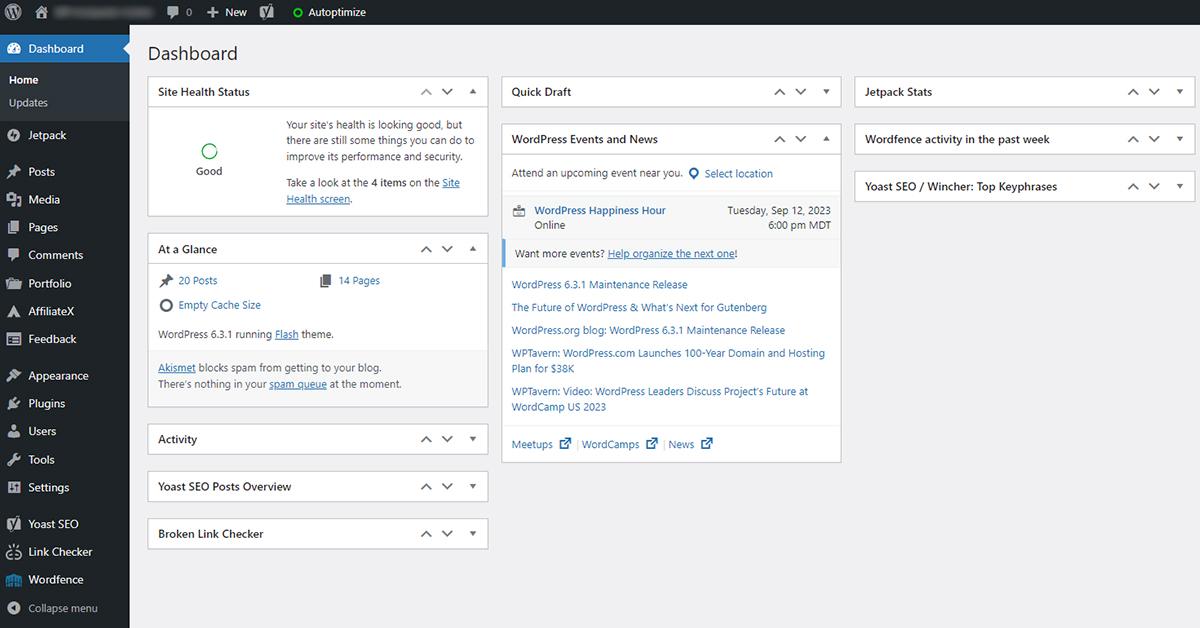
You don’t need to know how to code to make a website with WordPress, which is a powerful and easy-to-use platform.
In short, it’s like having a system that’s already set up and ready to go; all you have to do is arrange and customize it to fit your needs.
Let's Break It Down in Simple Terms :-
Look at it this way:
👉 Instead of making bricks, cement, and structure from scratch, you are using pre-made blocks to build your house.
- Don’t worry about the technical base.
- You only need to think about the design, layout, and content.
That’s how WordPress works, exactly.
How WordPress Really Works :-
WordPress breaks everything down into three main parts:
1. Themes (Design)
Themes decide what your website looks like.
- You can change the style, colors, layout, and fonts.
- There are thousands of free and paid themes to choose from.
- No need to know how to design
👉 You can use themes to make a business website, a blog, or an eCommerce store, for example.
2. Plugins (Features)
Plugins give your website more features.
- Contact forms
- SEO tools
- Security
- Speed optimization
- Online store (WooCommerce)
👉 Just install and turn it on—no coding needed
3. The dashboard (control panel)
This is where you take care of everything.
- Add pages & blog posts
- Upload images
- Install themes/plugins
- Track performance
👉 It’s as easy as using an app on your phone or Facebook.
🚀 Why Beginners Love WordPress :-
This is why so many people use WordPress:
✔ No coding needed
✔ Fast website setup
✔ Cheap
✔ Easy for beginners
✔ Lots of help from the community
💬 Example from real life :-
Let’s say you want to make a blog like your baby products site. With WordPress:
- You can start it in one to two days.
- Easily write articles
- Put in affiliate links
- Make it better for SEO
No need for a developer!
🏁 Quick Summary
👉 WordPress is a website builder that is ready to use.
👉 It saves time, money, and effort.
👉 It is great for beginners and businesses that are growing.
💡 What is a Custom Website?
A custom website is one that is built from the ground up using coding languages like:
HTML, CSS, JavaScript, PHP, Python, React, and so on. Nothing is pre-made; everything is made and designed just for you.
Let's figure it out in a simple way. :-
Picture it like this:
👉 You are putting together a house from the ground up, brick by brick and design by design.
- You choose the shape
- You decide how it looks.
- You make every detail your own.
There are no pre-made templates; everything is made just for you.
⚙️ How a Custom Website Works :-
In a custom website, developers do everything by hand:
1. Make the design from scratch
- One-of-a-kind UI/UX design
- Made to fit your brand
- No templates were used
👉 Your site looks very different from other sites
2. Coding and Development
- For every feature, developers write code.
- Frontend: what users see.
- Backend: how it works behind the scenes.
👉 Everything is made to fit your needs
3. Custom Features
You can make anything you want:
- Dashboards made just for you
- More advanced ways to log in
- Systems for making reservations
- Difficult eCommerce features
- SaaS platforms
👉 You have full control with no limits like plugins.
🚀 Why Do Companies Choose Custom Websites?
People usually choose custom websites when:
✔ You want something that stands out
✔ You want it to work well
✔ You’re making a complicated platform
✔ You want full control over the features
💬 Example from Real Life :-
If you want to make something like this:
- An app for food delivery, like Zomato
- A social network, like Facebook
- A dashboard for your business that you can customize
👉 This might not work well with WordPress
✔ A custom website is the best option here
⚠️ Things You Should Know :-
Before you choose custom development, you should know this:
❌ It takes longer (weeks or months)
❌ It costs more
❌ You need help from a developer
But you get:
✔ Complete freedom
✔ Improved performance
✔ One-of-a-kind experience
🏁 Short Summary
👉 A custom website is made just for you.
👉 It is built from scratch using code.
👉 Best for projects that are complicated, can grow, and are one of a kind
⚡ WordPress vs Custom Website (Quick Comparison)
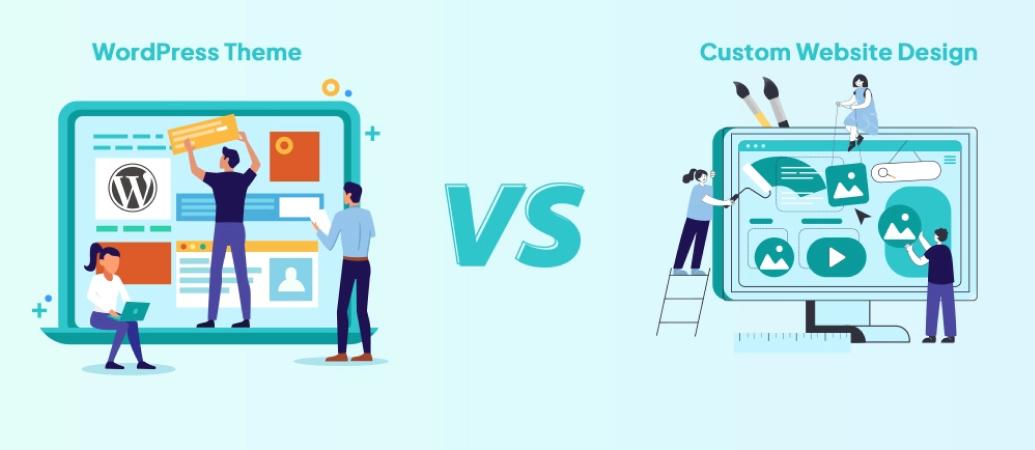
If you’re not sure whether to use WordPress vs Custom Website, this quick comparison will help you make up your mind right away 👇
📊 Side-by-Side Comparison :-
Feature
WordPress
Custom Website
🚀 Setup Time
💰 Cost
🎯 Flexibility
🔧 Maintenance
⚡ Performance
📈 Scalability
💻 Coding Required
Fast (1–3 days)
Low (Budget-friendly)
Medium
Easy (No coding)
Good
Medium
No
Slow (Weeks/Months)
High (Developer cost)
Very High
Technical (Developer needed)
Excellent (if optimized)
High
Yes
What This Actually Means (Simple Explanation) :-
Let me break this down in a real-life, easy-to-understand way 👇
🚀 Setup Time
- WordPress: You can launch your website in 1–3 days
- Custom: Takes weeks because everything is built from scratch
👉 If you want quick results, WordPress is the winner
💰 Cost
- WordPress: Low cost (themes + plugins + hosting)
- Custom: Expensive (developer + design + maintenance)
👉 Best for beginners → WordPress
🎯 Flexibility
- WordPress: Limited to themes/plugins
- Custom: Unlimited possibilities
👉 Want something unique? → Custom website
🔧 Maintenance
- WordPress: Easy updates (1-click)
- Custom: Needs developer support
👉 Non-technical users → WordPress
⚡ Performance
- WordPress: Good (depends on optimization)
- Custom: Faster (clean code, no extra load)
👉 Performance-focused projects → Custom
📈 Scalability
- WordPress: Can grow, but with limits
- Custom: Built to scale big
👉 Large platforms → Custom
💻 Coding
- WordPress: No coding required
- Custom: Full coding knowledge needed
👉 Beginners → WordPress
🏁 Quick Final Insight
👉 If you want:
- Fast
- Affordable
- Easy to manage
✔ Go with WordPress
👉 If you want:
- Full control
- High performance
- Unique features
✔ Go with Custom Website
💬 Simple truth:
Most people (especially beginners and bloggers) should start with WordPress, and only move to custom when they really need it.
🚀 1. Speed of Development (WordPress vs Custom Website)
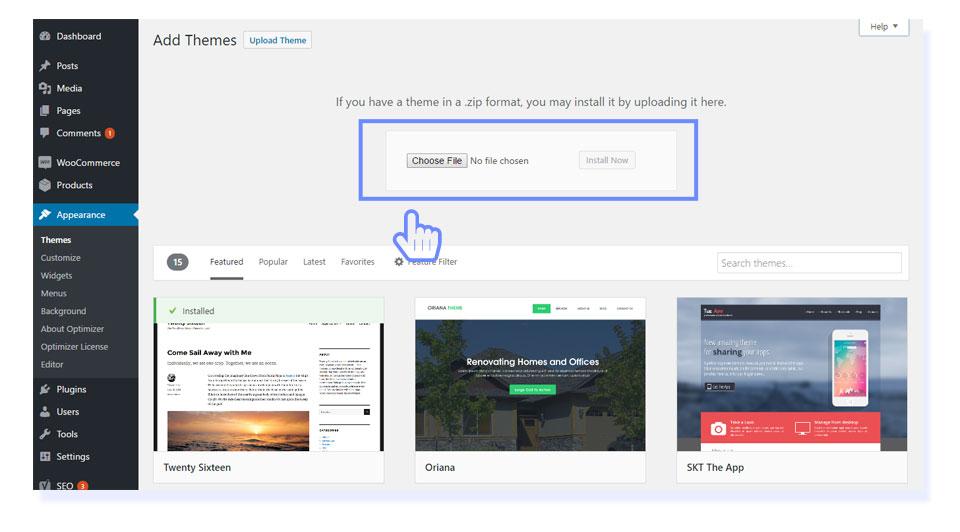
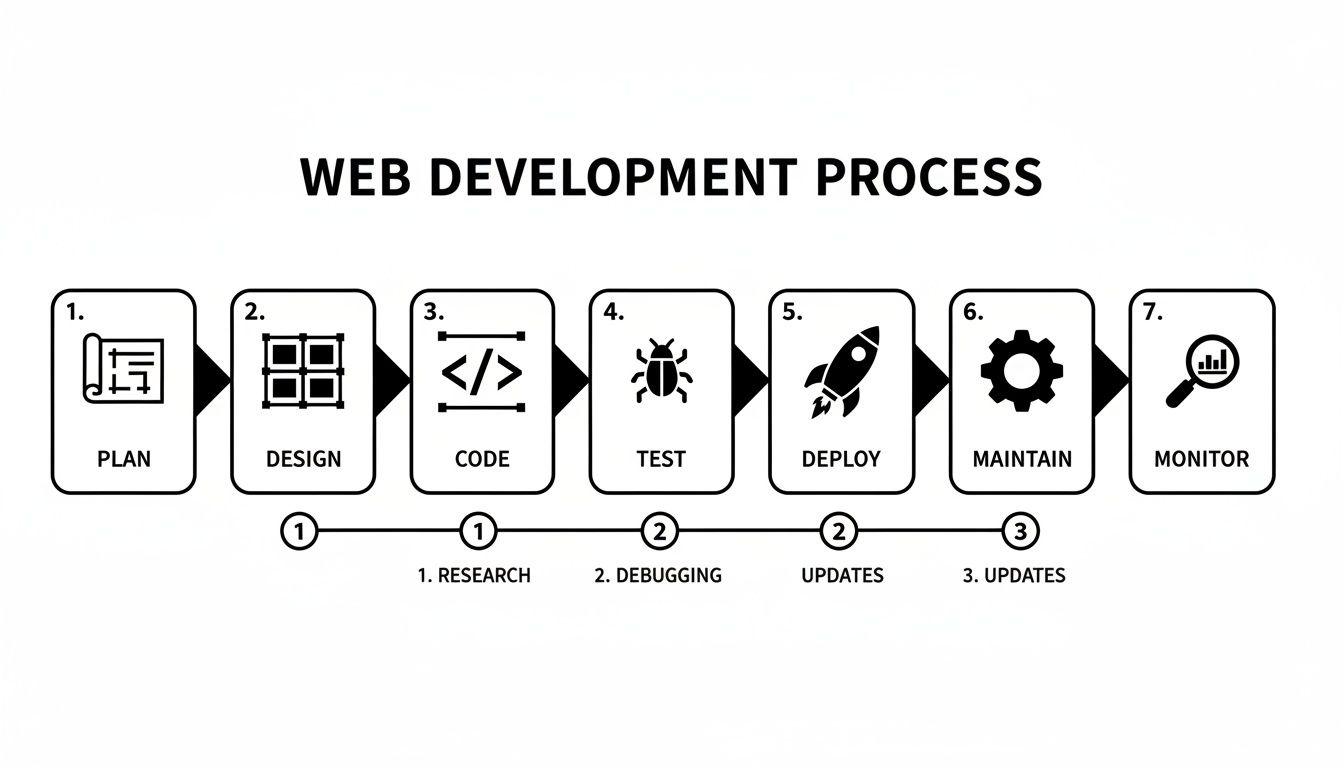
The first and most obvious difference between WordPress and a custom website is how quickly you can get your site up and running.
👉 WordPress is the best (fast and easy) :-
You can make and launch your website with WordPress in one to three days, and sometimes even in a few hours.
Why?
- Pre-made themes (ready-made designs)
- Plugins that are ready to use (features)
- No need to code
- Easy dashboard for setting up
👉 You don’t have to start from scratch; just install, make changes, and go live.
👉 Custom Website (Takes a lot of time) :-
Building a custom website takes a lot longer because you have to do it one step at a time:
- Design from the ground up
- Frontend and backend development
- Testing and fixing bugs
- Deployment
⏳ Total time: Weeks to Months Coding and testing are needed for even the smallest feature, which takes more time.
Real-Life Understanding
Think this way:
- WordPress = A ready-to-use setup that you can just set up and use.
- Custom Website = Build everything from the ground up. It takes time, but it’s completely unique.
✔ Best for (WordPress)
WordPress is perfect if you are:
- 👶 Beginner
- ✍️ Blogger
- 🏪 Small business owner
- 💼 Freelancer
- 🚀 Want quick online presence
Simple Conclusion
👉 If you want speed and ease of use, WordPress is the clear winner.
👉 If you can wait and need something advanced, go for custom.
💰 2. Cost Comparison (WordPress vs Custom Website)
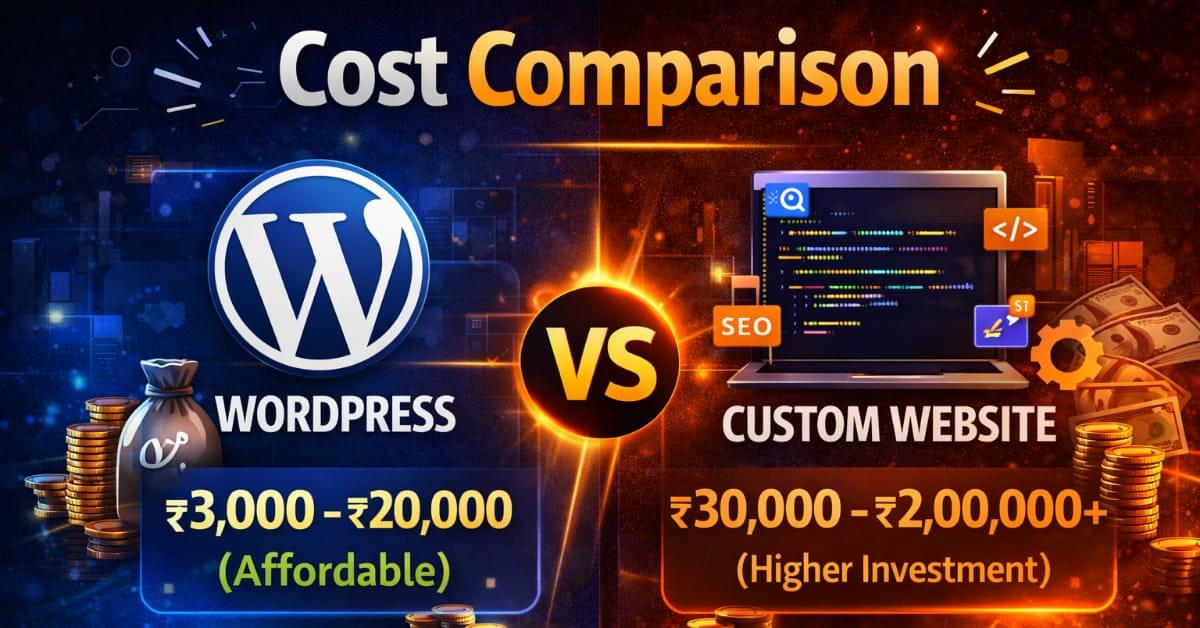
Cost is one of the most important things to think about when choosing between WordPress vs Custom Website, especially if you’re just starting out.
Let’s make it simple and easy to understand 👇
👉 WordPress is Budget-Friendly 💸 :-
With WordPress, you don’t need a big investment to get started.
Your main costs include:
- 🌐 Hosting (₹1,500 – ₹5,000/year)
- 🎨 Theme (Free or ₹2,000 – ₹5,000 one-time)
- 🔌 Plugins (Mostly free, some premium optional)
👉 The best part?
You can even start with almost zero cost using free themes & plugins.
👉 Custom Website is Expensive 💼 :-
A custom website requires professional work from developers and designers.
Costs include:
- 👨💻 Developer charges
- 🎨 UI/UX design
- 💻 Coding (frontend + backend)
- 🔧 Maintenance & updates
👉 Every feature = extra cost
👉 Every change = additional charges
💡 Reality Check (India Pricing)
Here’s what you can expect in real life:
- ✅ WordPress Website: ₹3,000 – ₹20,000
- ❌ Custom Website: ₹30,000 – ₹2,00,000+
Simple Understanding
Think like this:
- WordPress = Renting a fully furnished house 🏠
- Custom Website = Building your own house from scratch 🏗️
👉 One saves money and time
👉 The other gives full control but costs more
🎯 Who Should Choose What?
✔ Choose WordPress if:
- You have a low budget
- You are a beginner
- You want a quick launch
✔ Choose Custom Website if:
- You have a high budget
- You need advanced features
- You are building a large or unique platform
🏁 Final Insight
👉 If money is an issue, WordPress is the clear winner. If money isn’t a problem and you want full control, go with a custom option.
💬 Honest Advice:
Use WordPress to get your business off the ground, and then buy a custom website when you need one.
🎯 3. Flexibility & Customization (WordPress vs Custom Website)

This is where the real difference between WordPress and a custom website becomes clear: how flexible and customizable they are.
👉 Custom Website Wins (Full Freedom) 🏆
You have full control over everything with a custom website.
- You can make anything you can think of 🎨
- You can make any feature you want ⚙️
- No limits, no restrictions
If it’s
- A personalized dashboard
- A way to make reservations
- A one-of-a-kind experience for users
- Or a complicated web app
✔ Everything is made just the way you want it
👉 WordPress (Not Very Flexible)
WordPress is flexible, but not all the time.
- You need themes for design
- You need plugins to add features.
- You can only customize what the tools let you.
If a plugin doesn’t meet your needs:
- You will need to write your own code.
- Or you might not be able to make that feature at all.
Simple Understanding
Think like this:
- WordPress = Customizing a ready-made template
- Custom Website = Creating your own design from scratch
👉 One gives convenience
👉 The other gives complete control
💡 Example from real life
What if you want:
- WordPress is all you need for a normal blog or business website.
- A unique platform with special features means you need a custom website. When to Choose Custom Website
✔ When to Choose Custom Website
Go for a custom website if:
- You want a completely unique design
- You need advanced or rare features
- You are building something like:
- SaaS product
- Marketplace
- Custom system
🏁 Final Insight
👉 WordPress is great if you want things to be simple and easy.
👉If you want something that is one of a kind and gives you full control, a custom website is the best choice.
💬 Honest Advice:
WordPress is enough for most beginners because they don’t need a lot of customization.
But if you’re making something big and new, go with custom.
🔧 4. Maintenance & Updates (WordPress vs Custom Website)
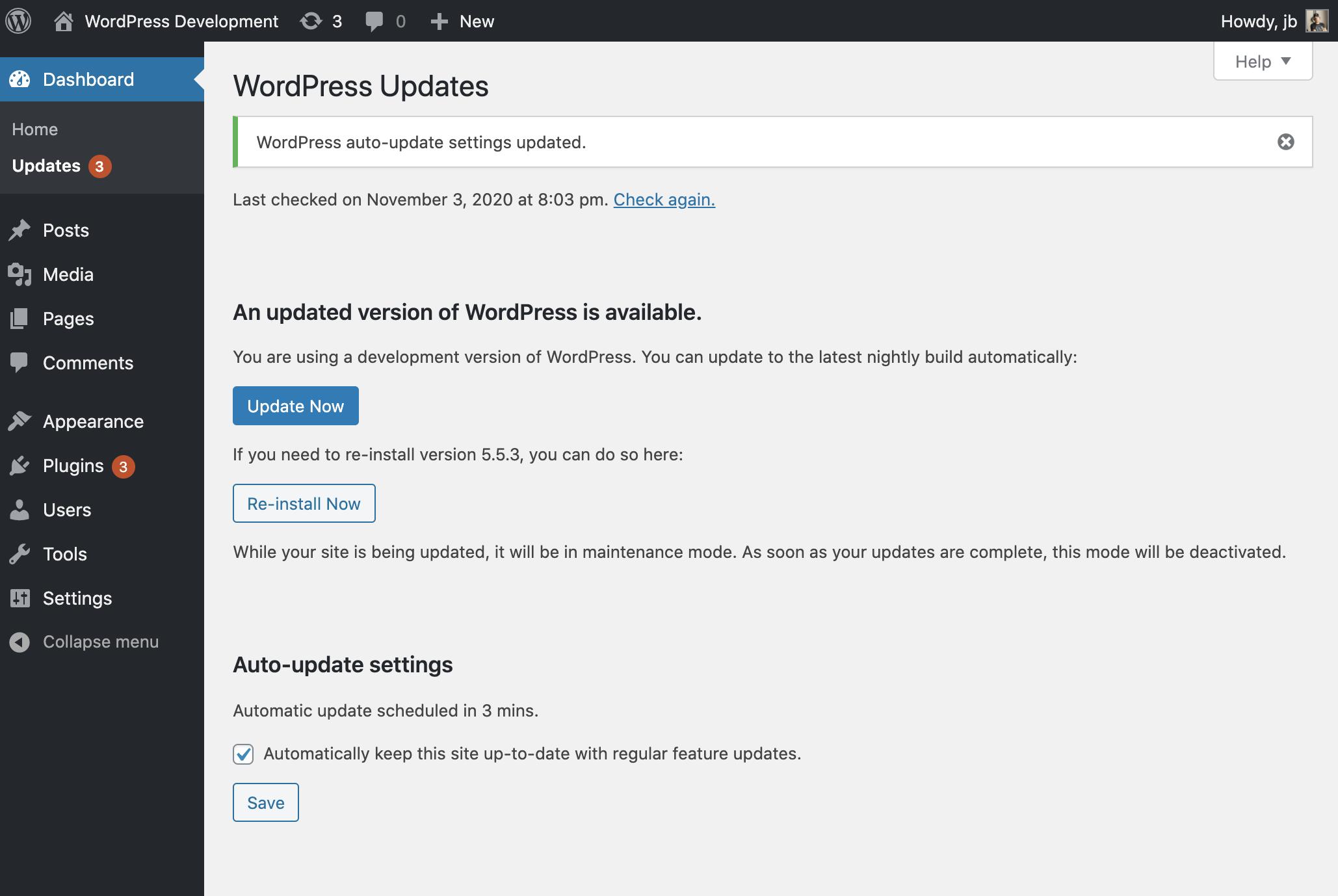

Most people don’t think about maintenance when they first start using WordPress vs Custom Website, but it becomes very important later on.
Let’s look at this in a simple, real-world way 👇
WordPress is easy to use and good for beginners.
With WordPress, maintaining your website is very simple.
- 🔄 One-click updates for themes & plugins
- 🛡️ Security updates available regularly
- ⚙️ No technical knowledge required
👉 You can manage everything yourself — just like using a mobile app
💡 You can still do these things, even if you’re new:
- Update your site
- Fix small issues
- Keep everything running smoothly
👉 Custom Website (Technical & Developer-Dependent) 👨💻
In a custom website, everything is manual.
- No automatic updates
- Bugs need to be fixed with coding
- Changes require developer support
👉 Even a small issue can require:
- Debugging
- Code changes
- Testing
⏳ Which means more time + more cost
Simple Understanding
Think like this:
- WordPress = Automatic car 🚗
(Easy to drive, less effort) - Custom Website = Manual car 🏎️
(More control, but needs skill)
⚠️ Important Reality
👉 WordPress is easy… but you still need to:
- Keep plugins updated
- Use trusted themes
- Maintain basic security
👉 Custom website is powerful… but:
- Fully dependent on developer
- Maintenance cost can increase over time
🏁 Final Insight
👉 If you want easy handling & less stress, go with WordPress
👉 If you have a developer or technical team, custom can work
💬 Truth you should remember:
WordPress = Beginner-friendly
Custom Website = Developer-dependent
⚡ 5. Performance & Speed (WordPress vs Custom Website)

When you compare WordPress to a custom website, speed and performance are very important for both user experience and SEO rankings.
Because let’s be real…
👉 No one likes a website that takes a long time to load 😅 And Google doesn’t either.
👉 Custom Website (Super Fast 🚀)
A custom website can be extremely fast if built properly.
Why?
- Clean and optimized code
- No extra or unnecessary features
- Only required functionalities are added
👉 This means:
- Faster loading time
- Better performance
- Smooth user experience
✔ Perfect for high-performance applications and platforms
👉 WordPress (Depends on Optimization)
WordPress websites are good… but speed depends on how you use it.
👉 If not optimized:
- Too many plugins
- Heavy themes
- Poor hosting
❌ Result → Slow website
✔ But Here’s the Good News 👍
You can make WordPress very fast with proper optimization:
- ⚡ Use caching plugins (like WP Rocket / LiteSpeed Cache)
- 🌍 Use CDN (Content Delivery Network)
- 🖼️ Optimize images
- 🚫 Avoid unnecessary plugins
- 🚀 Choose fast hosting
👉 With these steps, WordPress can perform almost like a custom website
Simple Understanding
Think like this:
- Custom Website = Lightweight bike 🏍️ (fast & efficient)
- WordPress (unoptimized) = Loaded truck 🚛 (slow)
- WordPress (optimized) = Sports car 🚗💨 (fast again!)
🏁 Final Insight
If performance is your number one goal, a custom website is the best choice.
But if you do it right, WordPress can also be fast, smooth, and good for SEO.
💬 Honest Advice:
Speed is not about platform… it’s about optimization
🔒 6. Security (WordPress vs Custom Website)

When you compare WordPress to a custom website, security is something you should never overlook, especially if your site handles payments, user data, or business information.
👉 Custom Website (More Secure — If Done Right) 🛡️
A custom website can be very safe because:
- Code is written just for your project.
- No extra features or plugins that are open to the public
- Less common weaknesses
Hackers usually go after well-known platforms, so custom sites are less likely to be hacked.
✔ But keep in mind:
The skills of developers affect security.
- Bad coding = risk to security
- Strong protection comes from strong coding.
👉 WordPress (Secure, But Needs Care) ⚠️
WordPress is safe… but you have to take care of it the right way.
- Uses add-ons for security, such as firewalls and malware scanners
- Updates are needed on a regular basis.
- Needs to be set up correctly
👉 WordPress is a common target for hackers because it runs millions of websites.
💡 Important Reality (Very Crucial)
👉 The following are the main reasons why WordPress sites get hacked:
❌ Old plugins and themes
❌ Weak passwords
❌ Using nulled or unsafe themes
❌ No security plugin
👉 Not because WordPress is weak!
🔐 How to Keep WordPress Secure
WordPress becomes very safe if you follow these simple rules:
- Always update your themes and plugins.
- Use strong passwords.
- Install a security plugin like Wordfence or Sucuri.
- Don’t use nulled themes or plugins.
- Enable SSL (HTTPS).
Simple Understanding
Think of it this way:
- Custom Website = Private house with custom security system 🏠
- WordPress = Popular apartment building 🏢
👉 The apartment is safe… but you have to make sure your door is locked right
Final thought
👉 A custom website can be safer (if it’s coded correctly)
👉 WordPress is also safe, but only if you keep it up to date.
💬 Remember this:
👉 It’s not about the platform when it comes to security.
👉 It’s all about how well you run your website.
📈 7. SEO (Search Engine Optimization) – WordPress vs Custom Website
SEO is one of the most important things to think about when choosing between WordPress vs Custom Website
👉 Both Can Rank on Google 🌍
First, let’s clear a big myth:
👉 Both WordPress and Custom Websites can rank on Google
Google doesn’t care which platform you use.
It only cares about:
- Content quality
- Website speed
- User experience
- SEO optimization
👉 WordPress Makes SEO Easier 😊
WordPress has a big advantage here, especially for people who are new to it.
🔌 SEO plugins like Rank Math and Yoast
✍️ Easy to edit content (pages and blogs)
🏷️ Easy to set up meta tags, titles, and descriptions
🔗 Internal linking is also easy
👉 You don’t need to know a lot about technology to do SEO.
✔ Perfect for:
- Bloggers
- Affiliate marketers
- Content creators
- Small businesses
👉 Custom Website (More Control, But Technical) 👨💻
In a custom website, SEO is fully manual.
- Meta tags need coding
- Sitemap setup manually
- Technical SEO handled by developer
- Content management is not always easy
👉 You get full control… but you need:
- SEO knowledge
- Developer support
🧠 Simple Understanding
Think like this:
- WordPress = SEO tools already installed 🧰
- Custom Website = Build your own SEO tools 🔧
👉 One is easy
👉 The other is powerful but technical
✔ Who Should Choose What?
👉 Pick WordPress if
- You want to set up SEO easily.
- You put out new content (blogs) on a regular basis.
- You want to get a good rank without any technical problems.
👉 Pick Custom Website if
- You have SEO experts or developers on staff.
- You need more advanced technical control.
- You’re making a complicated platform.
🏁 Final Insight
👉 WordPress is easy to use for SEO, quick, and good for beginners.
👉 You have full control over a custom website, but you need to know how to use it.
💬 Honest Advice:
If your main goal is to get traffic and rank well on Google,
✔ WordPress is the best option for you.
👍 Pros & Cons of WordPress
Pros of WordPress
😊 Beginner-Friendly
You don’t need any coding knowledge.
👉 Even if you’re starting for the first time, you can easily:
- Create pages
- Write blogs
- Manage your website
🚀 Fast Setup
With WordPress, your website can go live in 1–3 days.
- Ready-made themes
- Demo import options
- Easy customization
👉 Perfect if you want quick results
💰 Affordable
WordPress is very budget-friendly.
- Free themes & plugins available
- Low hosting cost
- No need to hire developers initially
👉 Best for beginners and small businesses
🔌 Thousands of Themes & Plugins
You get access to a huge ecosystem:
- Design (themes)
- Features (plugins)
- SEO tools
- Security tools
👉 Almost everything is just one click away
📈 SEO-Friendly
WordPress makes SEO easy:
- Plugins like Rank Math / Yoast
- Easy meta setup
- Blog-friendly structure
👉 Great for ranking on Google
Cons of WordPress
🔌 Plugin Dependency
Most features depend on plugins.
👉 Too many plugins can:
- Slow down your website
- Create conflicts
⚡ Can Become Slow
If not optimized properly:
- Heavy themes
- Too many plugins
- Poor hosting
❌ Result → Slow loading website
🎯 Limited Deep Customization
WordPress has limits when it comes to:
- Advanced features
- Unique systems
- Complex platforms
👉 For such needs, custom development is better
🧠 Simple Understanding
Think like this:
- WordPress Pros = Easy, fast, affordable 👍
- WordPress Cons = Limited control, needs optimization ⚠️
🏁 Final Insight
👉 WordPress is perfect for 90% of users
👉 But not ideal for highly complex or unique platforms
💬 Honest Advice:
If you’re just starting, WordPress is more than enough.
You can always upgrade to a custom website later 🚀
👍 Pros & Cons of Custom Website
Pros of Custom Website
🎯 Fully Customizable
This is the biggest advantage.
👉 You can build anything you imagine:
- Custom features
- Unique layouts
- Advanced systems
✔ No limitations like themes or plugins
⚡ High Performance
Custom websites are usually faster because:
- Clean and optimized code
- No unnecessary features
- Built only for your needs
👉 Result → Better speed + better user experience
🎨 Unique Design
Your website will look completely different from others.
- No template-based design
- 100% brand-focused UI/UX
👉 Perfect for businesses that want a strong identity
🔧 Better Control
You have full control over:
- Functionality
- Performance
- Security
- Scalability
👉 Nothing is restricted
Cons of Custom Website
💰 Expensive
Custom development costs more because:
- You pay developers
- You pay for design
- You pay for maintenance
👉 Every feature = extra cost
⏳ Time-Consuming
Unlike WordPress, custom websites take time:
- Planning
- Designing
- Coding
- Testing
👉 It can take weeks or even months
👨💻 Requires Developer Support
You can’t manage everything yourself.
- Need developer for updates
- Need developer for changes
- Need developer for fixing bugs
👉 Full dependency on technical support
🧠 Simple Understanding
Think like this:
- Custom Website Pros = Power, flexibility, uniqueness 🚀
- Custom Website Cons = Cost, time, dependency ⚠️
🏁 Final Insight
👉 Custom websites are perfect for big ideas and advanced projects
👉 But not ideal for beginners or low-budget users
💬 Honest Advice:
If you don’t need advanced features right now, don’t jump into custom development.
Start simple… grow smart… and upgrade later 🚀
Which One Should You Choose? (WordPress vs Custom Website)
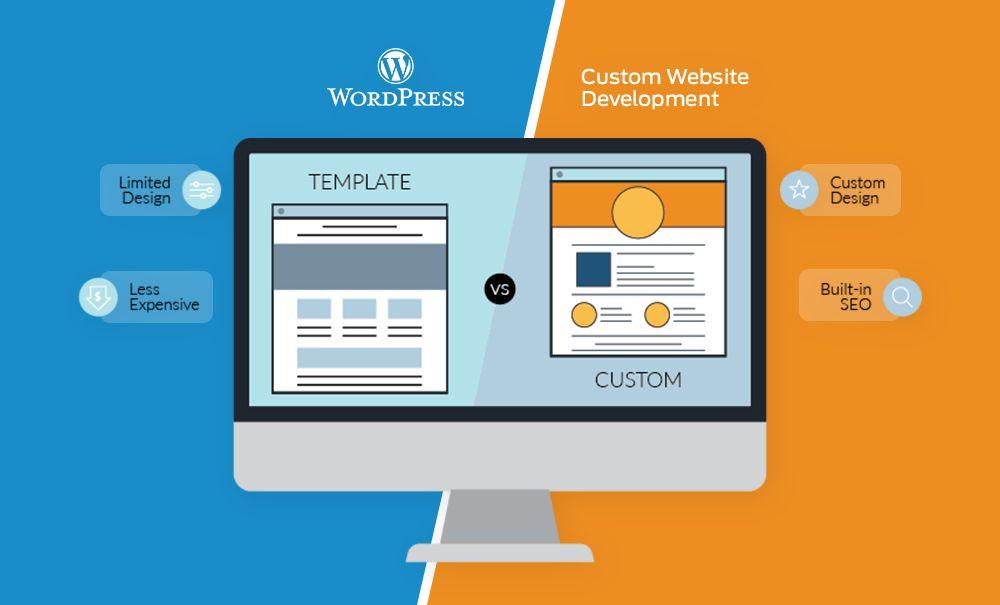
Now comes the most important question 👇
👉 Which one should you pick: WordPress or a custom website?
Let’s make this very easy and useful.
👉 Choose WordPress if:
WordPress is the right choice for you if:
- 👶 You are a beginner
- 🚀 You want quick results
- 💰 You have a low or medium budget
- 🛠️ You want to manage everything yourself (no coding)
📌 What are you building?
WordPress is perfect if you are creating:
- ✍️ Blog website
- 🏢 Business website
- 💸 Affiliate website
- 🛒 Small eCommerce store
👉 For most people (around 80–90%), WordPress is more than enough.
👉 Choose Custom Website if:
A custom website is better if:
- ⚙️ You need advanced or unique features
- 🎯 You are building something complex
- 👨💻 You have a developer or team
- 💰 You have a high budget
📌 What are you building?
Go for a custom website if you are creating:
- 📊 SaaS product
- 🌐 Complex platform (like a marketplace)
- 🧩 Custom web application
👉 In these cases, WordPress may feel limited.
🧠 Simple Understanding
- WordPress = Easy, fast, and affordable 👍
- Custom Website = Powerful, flexible, and advanced 🚀
🏁 Final Verdict (Honest Advice)
👉 If you’re just starting out → Go with WordPress
👉 As your business grows → You can switch to a custom website later
💬 Real Talk:
The best choice is not what others are using…
It’s what fits your goals, budget, and vision perfectly.
🧠 Real-Life Example (WordPress vs Custom Website)
Let’s make this super simple with real-life scenarios 👇
👉 Scenario 1: Blog or Business Website
Let’s say you want to create a website like your own brand:
- Blogging
- Service pages (web design, SEO, marketing)
- Contact forms
- Portfolio
✔ Best Choice: WordPress
Why?
- Easy to manage content
- SEO-friendly
- Quick to build
- Budget-friendly
👉 You don’t need complex coding for this type of website
👉 Scenario 2: Advanced Platforms & Apps
Now imagine you want to build something like:
- Zomato 🍔
- Facebook 📱
- A custom dashboard system for users
✔ Best Choice: Custom Website
Why?
- Advanced features required
- Real-time data processing
- Complex user interactions
- Scalability needed
👉 WordPress cannot handle such complex systems efficiently
Simple Final Understanding
- 🟢 Simple website (blog/business) → WordPress
- 🔵 Complex platform (apps/systems) → Custom Website
🏁 Final Insight
👉 Choose based on your project type, not just trend
💬 Honest Advice:
Start simple. Grow smart. Upgrade when needed 🚀
🏁 Final Verdict (Honest Answer)
Let’s be real for a moment…
👉 There is no “one-size-fits-all” answer when it comes to
WordPress vs Custom Website
Because the right choice always depends on:
- Your goals 🎯
- Your budget 💰
- Your timeline ⏳
- And your technical needs 💻
💡 But If I Had to Guide You Personally…
Based on real experience and what works for most people:
✔ 90% of people should start with WordPress
✔ 10% advanced businesses should go for a custom website
👉 Why?
Because most people:
- Don’t need complex features in the beginning
- Want fast results
- Have limited budget
- Need something easy to manage
And WordPress fits perfectly here ✅
💬 My Personal Advice (From Experience)
If you’re just starting your online journey:
👉 Don’t overthink.
👉 Don’t overspend.
👉 Don’t delay.
These are the 3 biggest mistakes beginners make.
🚀 What You Should Do Instead
- Start with WordPress
- Launch your website quickly
- Focus on content, traffic, and growth 📈
- Learn what actually works
👉 And when your business grows…
✔ You can always upgrade to a custom website later
Simple Final Thought
- Start simple
- Grow smart
- Scale when needed
💬 Truth:
A perfect website doesn’t make a successful business…
👉 A smart decision at the right time does.
❓ Frequently Asked Questions (FAQs)
1. What is the main difference between WordPress and a custom website?
👉 The main difference is that WordPress is a ready-made platform, while a custom website is built from scratch using coding.
- WordPress → Easy, fast, beginner-friendly
- Custom Website → Flexible, powerful, developer-based
2. Which is better: WordPress or a custom website?
👉 It depends on your needs.
- Choose WordPress if you want a quick, affordable website
- Choose Custom Website if you need advanced features and full control
👉 For most beginners, WordPress is the better choice
3. Is WordPress cheaper than a custom website?
👉 Yes, WordPress is much cheaper.
- WordPress cost: ₹3,000 – ₹20,000
- Custom website cost: ₹30,000 – ₹2,00,000+
👉 That’s why WordPress is best for beginners and small businesses
4. Can WordPress handle large or high-traffic websites?
👉 Yes, WordPress can handle large websites if properly optimized.
- Use good hosting
- Use caching plugins
- Use CDN
👉 Many high-traffic websites also use WordPress
5. Is a custom website faster than WordPress?
👉 Generally, yes.
- Custom websites use clean code → faster
- WordPress can be slower if not optimized
👉 But with proper optimization, WordPress can also be very fast
6. Which is better for SEO: WordPress or custom website?
👉 Both can rank on Google.
- WordPress → Easier SEO (plugins like Rank Math, Yoast)
- Custom Website → Full control but requires technical setup
👉 For beginners, WordPress is better for SEO
7. Do I need coding knowledge to use WordPress?
👉 No, you don’t need coding.
- You can build and manage your website easily
- Everything works with themes and plugins
👉 That’s why WordPress is beginner-friendly
8. When should I choose a custom website instead of WordPress?
👉 Choose a custom website if:
- You need advanced features
- You are building a SaaS or complex platform
- You have a high budget and developer support
9. Can I switch from WordPress to a custom website later?
👉 Yes, absolutely.
👉 Many businesses:
- Start with WordPress
- Grow their traffic and revenue
- Later upgrade to a custom website
10. Is WordPress secure for business websites?
👉 Yes, WordPress is secure if properly maintained.
- Keep plugins updated
- Use strong passwords
- Install security plugins
👉 Most security issues happen due to poor maintenance, not WordPress itself



Leave a reply