
Local SEO for Indian Businesses: How to Rank on Google in Your City (2026 Guide)
Ravi runs a small AC repair service in Thane. He’s been in business for 11 years, has over 200 happy customers, and does genuinely good work. But when someone in his neighbourhood searches “AC repair near me” on a Sunday afternoon, Ravi’s name doesn’t appear anywhere. A competitor who started 8 months ago shows up at the top — with 34 Google reviews and a fully filled profile.
Ravi isn’t losing business because of his skills. He’s losing it because of his digital address.
This complete guide to local SEO for Indian businesses covers exactly what you need to rank on Google in your city — step by step, no jargon. Whether you run a shop, offer a service from home, or are just starting out as a freelancer, this is how Indian businesses can rank higher on Google Maps and local search without spending a rupee on ads.
No fluff. Just what works.
What Is Local SEO and Who Needs It in India?
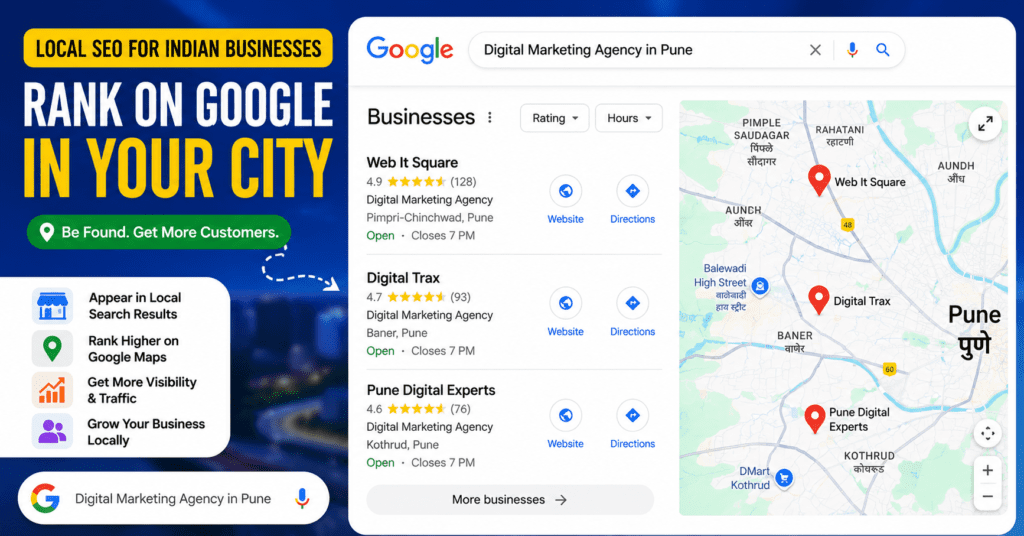
Local SEO for Indian businesses is the practice of making your business visible when people nearby search for what you offer. It’s not about ranking on page 1 for “best restaurant in India.” It’s about appearing when someone in Bandra searches “good Chinese restaurant near me” at 8 PM on a Friday.
Google uses three signals to decide who shows up in those local results:
- Relevance — Does your business match what the person is searching for?
- Distance — How close are you to the searcher?
- Prominence — How well-known and trusted is your business online?
Your GBP, your website, your reviews, your citations — they all feed into one or more of these three signals. Everything in this guide maps back to at least one of them.
Local SEO is different from regular (national) SEO in a fundamental way. A multinational chain might rank for “digital marketing agency” in a broad sense. But if someone in Nagpur searches “digital marketing agency in Nagpur,” they’re looking for someone local — someone they can call, visit, or WhatsApp. That’s your competition. Not the big guys. The other Nagpur agencies.
Who needs local SEO in India?
Anyone who serves customers in a specific city or area:
- Shops, salons, clinics, gyms, restaurants
- Freelancers (designers, photographers, CAs, tutors)
- Home-based businesses (tiffin services, home bakers, tailors)
- Service-area businesses (plumbers, electricians, pest control)
- Startups with a physical presence or city-specific service
Think of this as your Google local SEO guide for small businesses in India — whether you run a kirana store in Jaipur, a coaching class in Pune, or a home-based service in Navi Mumbai.
The local SEO strategies for Indian businesses in this guide are built around how Google actually ranks local results — Relevance, Distance, and Prominence. Each step targets at least one of these three directly.
If your customers come from within your city, local SEO is the highest-ROI marketing you can do — and a large part of it is free.
👉 Want us to handle your local SEO end-to-end? Check out our SEO services. →
Step 1: Google Business Profile — The Foundation of Local SEO for Indian Businesses
Google Business Profile (GBP) is the foundation of local SEO for Indian businesses — it’s the first thing Google checks when deciding who to show in city-based searches. It’s the card that appears when someone searches your business name, or when you show up in the map pack — those three listings that appear above organic results for local searches. This is how Indian businesses can rank higher on Google Maps and local search: by having a complete, verified, actively managed GBP.
Here’s how to do it properly.
Claim and verify your profile first
Go to business.google.com and either claim your existing listing or create a new one. Many Indian businesses already have auto-generated listings that nobody has claimed. Search for your business name — you may find it already exists.
Verification in India usually happens via postcard (takes 5–14 days) or video call. The postcard can be unreliable if your address has complex formatting — building name, wing, floor, flat number. If you don’t receive it in two weeks, request a video verification instead.
Important: An unverified profile is invisible in most local searches. Don’t skip this step.
Fill every single field
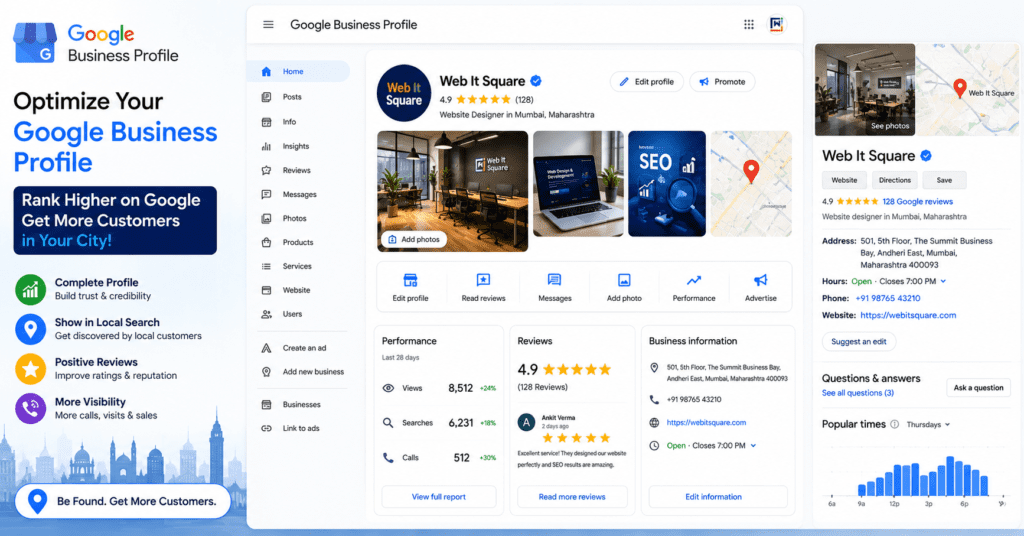
This sounds obvious but most businesses stop at name, address, and phone. Don’t. Fill:
- Business name — Use your real name exactly. Don’t stuff keywords like “Rahul Plumbing Best Plumber Mumbai.” Google will suppress you for it.
- Business hours — Including special hours for Sundays and public holidays. A customer who drove to your shop and found it closed because your hours were wrong will leave a 1-star review.
- Category — Choose the most specific primary category available. A “Dental Clinic” will outperform “Healthcare” every time. You can add secondary categories too.
- Description — You get 750 characters. Use them. Mention your core services, your city or area, and what makes you different. Write it the way you’d explain your business to a friend.
- Photos — Minimum 5. Include your storefront exterior, the interior, your team, and your product or service in action. Profiles with photos get 42% more direction requests than those without.
The India-specific address trick nobody talks about
Indian addresses confuse Google. “Plot 14, Sector 7, Kharghar, Navi Mumbai” doesn’t tell a new customer anything about where you actually are. In your business description, add a landmark reference: “Located opposite Kharghar railway station, near Big Bazaar.” This is how Indian customers actually navigate, and Google uses it for relevance matching.
Use GBP Posts — most businesses don’t
Inside your GBP dashboard there’s a “Posts” feature. Think of it as a mini social media post that shows on your Google listing. Post weekly. Share an offer, announce a new service, post a photo of recent work. It takes 5 minutes and signals to Google that your business is active — which directly helps your ranking.
Pre-populate the Q&A section
Your GBP has a Q&A section where anyone can ask questions. Here’s the hack: you can ask and answer questions yourself. Write the 5–6 questions you get asked most often — “Do you offer home service?”, “Do you accept UPI?”, “Is parking available?” — and answer them yourself. This saves customers time and adds keyword-rich content to your profile.
GBP suspension — the Indian trap
GBP suspensions are unusually common in India, often because of address verification mismatches, suspicious edits, or category violations. Signs you’re at risk: your address format is inconsistent across platforms, you’ve made multiple edits in a short time, or your category doesn’t match your actual business. If you get suspended, don’t panic — file a reinstatement request with supporting documents (GST certificate, shop licence, utility bill showing the address). It takes time, but it’s fixable.
Step 2: How Indians Actually Search — Hinglish Keywords and Vernacular SEO
This is the section that most SEO guides completely ignore — and it’s costing Indian businesses thousands of potential customers.
People in India don’t always search in proper English. They search the way they talk. And in India, that often means Hinglish — a casual mix of Hindi and English — or local language mixed with English.
Real searches happening right now in Indian cities:
- “sasta dentist Malad” (cheap dentist in Malad)
- “ghar ke paas AC repair wala” (AC repair near home)
- “best parlour in Koramangala” — note: “parlour” not “salon”
- “tiffin service Powai” not “meal delivery service Powai”
- “CA near me Rajkot” not “chartered accountant services Rajkot”
Why does this matter for your SEO?
Google’s understanding of language has improved massively. If your GBP description and website content uses words your customers actually use, you match their searches better. A dental clinic that mentions “affordable dental care” in its description is less likely to match “sasta dentist” than one that uses both English and the Hindi/regional phrasing.
How to find Hinglish keywords for your business
- Google autocomplete — Start typing your service into Google Search from your phone. Note what it suggests. These are real searches people are making.
- Google Trends — Filter by India and your state. Compare “parlour” vs “salon,” “hospital” vs “nursing home,” “coaching” vs “tuition.”
- Ask your customers — Literally ask 5 customers “how did you find us?” and “what did you type?” You’ll be surprised.
Micro-neighbourhood targeting
Here’s another angle nobody covers: Indian cities are hyperlocal. “South Delhi” is meaningless to someone in Malviya Nagar. “Koramangala” is too broad for someone in the 5th Block.
Rank for the smallest area your customers identify with. That means targeting:
- Colony or society names: “gym in Hiranandani Gardens”
- Landmark references: “dentist near Inorbit Mall Malad”
- Mohalla/ward names: “chartered accountant in Lajpat Nagar”
Include these micro-neighbourhood terms in your GBP description, your Posts, and your website’s location page. You’ll face far less competition than you would targeting the entire city.
Step 3: NAP Consistency — A Core Local SEO Strategy for Indian Businesses to Improve Google Rankings
Successful local SEO for Indian businesses depends heavily on one thing most owners overlook — consistency. And among all the local SEO strategies for Indian businesses to improve Google rankings, getting your NAP right is the quickest win with no cost at all. NAP stands for Name, Address, Phone number. Google cross-references these three pieces of information across the web to verify that your business is real and trustworthy. If your address says “Rd.” on JustDial but “Road” on your website, that tiny inconsistency adds up across dozens of platforms and sends mixed signals to Google.
The rule: Your business name, address, and phone number must be identical everywhere they appear.
A few common Indian mistakes:
- Using a landline on GBP but a mobile number on the website
- Using a toll-free number instead of a local number with your city STD code (a local number is a stronger local signal)
- Listing different shop numbers or floor numbers on different platforms after a move
The Indian directories worth your time
Not all directories are equal. Here’s what actually matters for Indian local SEO:
| Directory | Best for | Why it matters |
|---|---|---|
| JustDial | All businesses | Google pulls business data directly from JustDial in many cases |
| Sulekha | Services (plumbers, tutors, events) | High domain authority, ranks independently |
| IndiaMART | B2B, manufacturing, wholesale | Powerful for trade-related searches |
| Practo | Healthcare (doctors, clinics, labs) | Google features Practo listings for healthcare searches |
| Zomato / Swiggy | Restaurants and cloud kitchens | Appear in food-related local searches directly |
| Urban Company | Home services (repair, beauty, cleaning) | Ranks for service-type searches |
| TradeIndia | Industrial, B2B | Strong for manufacturing and wholesale businesses |
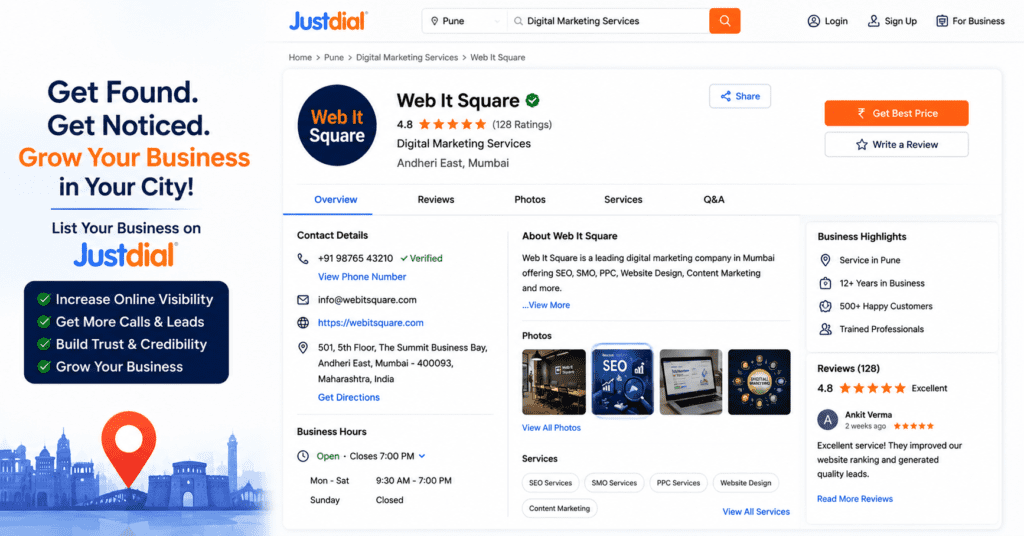
Start with JustDial and Sulekha for most businesses. Make sure your NAP is identical to your GBP listing.
On free vs paid: for most small businesses, free listings on 5–6 relevant directories beat a paid listing on one. Paid listings are worth it only on Practo (for healthcare) and Zomato (for food).
Step 4: The WhatsApp-to-Google-Review Funnel — India’s Secret Review Strategy
Reviews are one of the strongest ranking factors in local SEO. A business with 50 genuine reviews will almost always outrank a competitor with 5, everything else being equal. You probably know this. What you probably don’t know is why most Indian businesses fail at getting reviews — and how to fix it.
The problem: Email review requests don’t work in India. Open rates are low, customers don’t check email as religiously, and the action friction is too high.
The solution: WhatsApp.
India has over 500 million WhatsApp users. Your customers already message you there. The open rate for WhatsApp messages is over 95%. Here’s the exact process:
Step 1 — Get your GBP review shortlink
Log into your Google Business Profile dashboard → click “Get more reviews” → copy the short link. It looks like: g.page/YourBusinessName/review
Step 2 — Create a WhatsApp message template
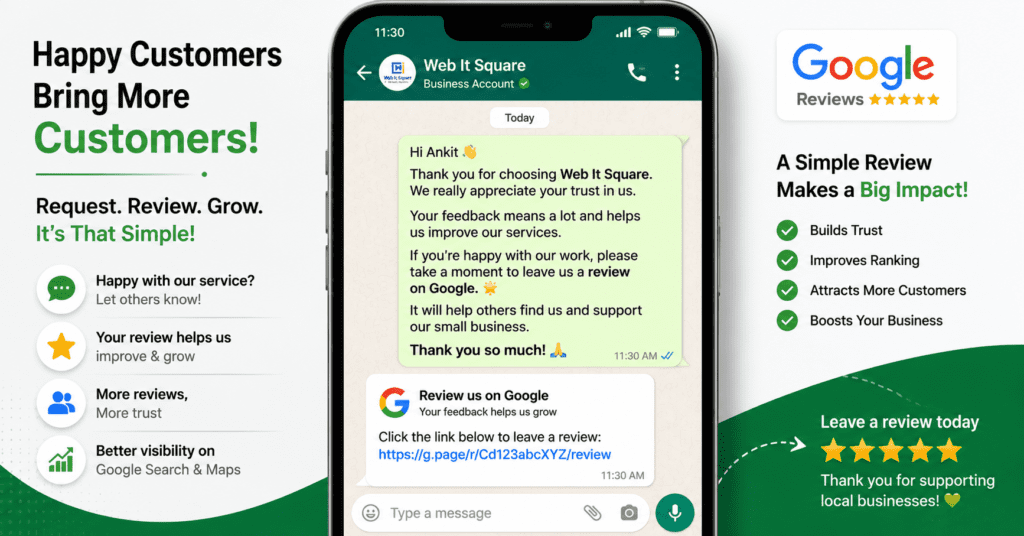
Write something like:
“Hi [Name], thank you for choosing us! If you’re happy with our service, we’d really appreciate a quick Google review — it helps other customers find us. Here’s the link: [your GBP review link]. It takes just 30 seconds! 🙏”
Keep it warm, keep it short, and always use the customer’s name.
Step 3 — Send it at the right moment
The best time to ask for a review is 1–2 hours after the service is completed — when the positive experience is fresh. Not a week later. Set a reminder for yourself or your staff.
WhatsApp Business as a local signal
If you use WhatsApp Business (you should), make sure your profile has your complete address, business hours, and a catalogue of services. While this doesn’t directly feed into Google’s ranking algorithm, it’s a secondary online presence that Google is increasingly indexing — and it builds trust with customers who research you before calling.
On reviews — a word of warning
Never buy fake reviews. Not because it’s unethical (though it is), but because it doesn’t work anymore. Google’s spam detection in 2026 is good at spotting review patterns — multiple reviews from new accounts, reviews from the same IP, suspicious timing clusters. You’ll get your reviews removed and risk a penalty. One genuine review is worth more than ten fake ones.
Step 5: Festive and Seasonal SEO — India’s Biggest Local Ranking Opportunity
Here’s something no competing article will tell you: the Indian festival calendar is a predictable SEO goldmine.
Google sees massive spikes in local search volume around festivals. In the 2 weeks before Diwali, searches for “gift shops near me”, “dry fruit shops near me”, “sweets delivery [city]” jump 8–12x. Around Eid, searches for “biryani near me” and “clothing stores open Sunday” surge. During Navratri in Gujarat, “garba classes near me” becomes extremely competitive.
Most Indian businesses know about this traffic. Most do nothing about it in terms of SEO.
What to do before a major festival
2–3 weeks before Diwali, Navratri, Christmas, Eid, Onam, Durga Puja:
- Update your GBP special hours — If you’re open extra hours or have different timings, update it. Google prominently shows “open now” / “closes at…” and customers use it.
- Create a GBP Event post — Go to Posts → Add Event → Set a start/end date, write a festive offer or promotion, and add a photo. These appear prominently on your listing.
- Add festive photos — A Diwali-decorated storefront or a special festive menu photo signals relevance and activity.
- Update your description temporarily — Add one line about your festive offerings.
Festive landing pages on your website
For businesses where seasonal demand is significant (gift shops, sweet shops, clothing boutiques, event venues, caterers), create dedicated pages like:
- “Diwali Gift Delivery in Ahmedabad”
- “Christmas Cake Orders in Chennai”
- “Holi Package Tours from Delhi”
Publish these pages 4–6 weeks before the festival so Google has time to index and rank them. After the festival, don’t delete the pages — update them for the next year. A page with history and some backlinks will rank faster than a brand new one.
Quick festive SEO calendar
| Festival | When to start | Key keywords |
|---|---|---|
| Navratri / Dussehra | Early September | garba classes, festive clothes, dandiya night |
| Diwali | Early October | gifts near me, sweets delivery, decoration shops |
| Christmas / New Year | Late November | party venues, cakes, gifts |
| Eid-ul-Fitr | 3–4 weeks before | biryani delivery, clothing, jewellery |
| Holi | February | colour suppliers, packages, events |
| Onam | July–August | sadhya catering, Kerala restaurants |
Step 6: On-Page Local SEO for Indian Businesses — Optimise Your Website for Your City
Your GBP is your most important asset, but your website is the second pillar of local SEO for Indian businesses — GBP gets you in the map pack, your website tells Google you’re the real deal. Here’s what to focus on.
Title tag and meta description
Your homepage title tag should include your primary service and your city. Something like:
“WordPress Website Design in Mumbai | Web It Square”
Not just “Web It Square — Website Design Company.” City matters.
Create a dedicated location/contact page
Don’t rely on your homepage alone. Create a separate page with:
- Your full address (match your GBP exactly)
- An embedded Google Map (go to Google Maps → your location → Share → Embed)
- Business hours
- Phone number and WhatsApp link
- A short paragraph mentioning your city and neighbourhood
This page is one of the first things Google looks at to verify your local relevance.
Add LocalBusiness schema markup
Schema markup is a piece of code that tells Google exactly what your business is. Here’s a simple JSON-LD template — paste it into your website’s <head> section or use a plugin like Rank Math if you’re on WordPress:
json
{
  "@context": "https://schema.org",
  "@type": "LocalBusiness",
  "name": "Your Business Name",
  "address": {
    "@type": "PostalAddress",
    "streetAddress": "Shop 4, Sunshine Complex, Link Road",
    "addressLocality": "Andheri West",
    "addressRegion": "Maharashtra",
    "postalCode": "400058",
    "addressCountry": "IN"
  },
  "telephone": "+91-9702222831",
  "url": "https://yourwebsite.com",
  "openingHours": "Mo-Sa 10:00-19:00"
}
If you’re on WordPress, Rank Math’s local SEO module handles this automatically.
Mobile speed — don’t skip this
India’s average mobile internet speed is lower than most countries. A page that loads in 4 seconds loses customers. Go to PageSpeed Insights, enter your URL, and check your mobile score. Anything below 60 needs fixing.
The quick wins: compress your images (use WebP format), remove unnecessary plugins if you’re on WordPress, and use a caching plugin like WP Rocket or LiteSpeed Cache.
Click-to-call and WhatsApp above the fold
On mobile, your phone number and WhatsApp button should be visible without scrolling. Not in the footer. Not after a long banner image. Right there, at the top. Indian customers call or WhatsApp to enquire before they fill out a form — make it effortless.
Step 7: Local SEO for Home-Based and Service-Area Businesses
Most SEO guides assume you have a shop or office. A huge chunk of Indian businesses don’t — and Google’s guidance for them is different.
If you run your business from home and don’t want to show your address publicly, here’s what to do:
When setting up your GBP, choose “I deliver goods and services to my customers.” This lets you hide your home address while still appearing in local searches. You’ll then set a “service area” — the localities, cities, or radius you serve.
This applies to:
- Home tutors and coaching teachers
- Tiffin and home food services
- Interior designers
- Freelance photographers, designers, writers
- Chartered accountants and lawyers working from home
- Home bakers and boutique clothing businesses
Setting your service area smartly
Don’t just draw a 10 km circle. In cities like Mumbai, Pune, or Delhi, 5 km in the wrong direction means a completely different market with different competition. Instead, manually list the localities you want to rank in — Bandra, Khar, Santa Cruz — rather than picking a radius. This gives you more precise control over where you appear.
Ranking in multiple areas without multiple offices
Service-area businesses often want to rank in 3–4 different parts of a city. The strategy is to create dedicated location pages on your website:
- yoursite.com/tiffin-service-bandra
- yoursite.com/tiffin-service-andheri
- yoursite.com/tiffin-service-goregaon
Each page should be unique — don’t just copy-paste the same text and swap the locality name. Write genuinely different content for each area, mention local landmarks, and include a local number if you have one.
Freelancers: use your GBP as a portfolio signal
If you’re a freelancer — designer, photographer, developer, content writer — your GBP can still be incredibly powerful. Use the category that matches your skill precisely: “Graphic Designer,” “Wedding Photographer,” “Web Developer.” Post samples of work in your GBP Photos section. Let the quality of what you do speak through the listing, not just the text.
Step 8: How to Measure Your Local SEO Results — Track What’s Working
Any local SEO strategy for Indian businesses is only as good as what you can measure. This is where most guides end without giving you what you actually need — a way to know if any of this is working.
GBP Insights — your free local analytics dashboard
Inside your Google Business Profile, click on “Performance.” You’ll see:
- Search views — How many times your listing appeared in search results
- Map views — How many times you appeared on Google Maps. This is your clearest indicator of whether your local search visibility is growing.
- Calls — Direct calls from your GBP
- Direction requests — People clicking “Get directions” to your location
- Website clicks — People clicking through to your site
What you want to see: steady week-over-week growth in calls and direction requests. These are the metrics that translate to actual business. If your profile gets 1,000 impressions but zero calls, something is off — usually photos, reviews, or your category selection.
These numbers tell you directly how well you’re ranking on Google Maps and local search — track them every week and compare month on month.
Google Search Console for local query tracking
If your website is connected to Google Search Console (free, at search.google.com/search-console), go to Performance → Queries. Filter for your city name to see which local keywords are bringing you traffic and what position you’re ranking at.
Queries like “plumber in Pune” ranking at position 14? That’s page 2. A few more reviews and a better-optimised website might push you to page 1.
Free tools worth using
- Google Search Console — Track keyword rankings and impressions (free)
- BrightLocal — The best local SEO audit tool; free trial available
- Whitespark Citation Finder — Find where your competitors are listed (free tier)
- Google Maps — Manually search your top keywords from an incognito window to see where you actually rank
What to expect in 90 days
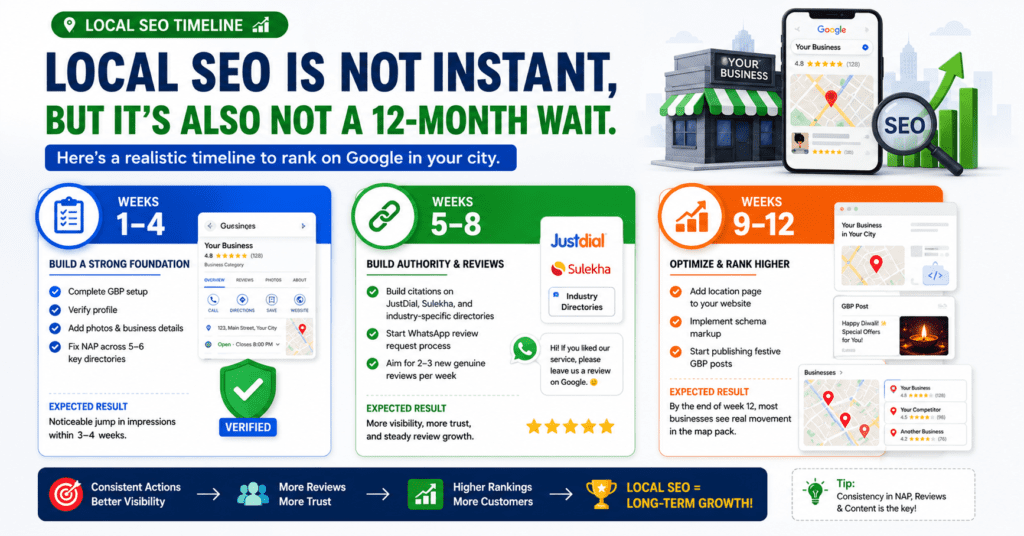
Local SEO is not instant, but it’s also not a 12-month wait. Here’s a realistic timeline:
Weeks 1–4: Complete GBP setup, verify profile, add photos, fix NAP across 5–6 key directories. This alone will often produce a noticeable jump in impressions within 3–4 weeks.
Weeks 5–8: Build citations on JustDial, Sulekha, and industry-specific directories. Start the WhatsApp review request process. Aim for 2–3 new genuine reviews per week.
Weeks 9–12: Add location page to your website, implement schema markup, start publishing festive GBP posts. By the end of week 12, most businesses with low-competition local keywords will see real movement in the map pack.
This 90-day plan is the core local SEO strategy for Indian businesses starting from scratch. If you’re already set up, jump to whichever week matches your current progress.
Frequently Asked Questions
How long does local SEO take to show results in India? For less competitive keywords (e.g., your specific service in a mid-sized city), you can see movement in the Google map pack within 4–8 weeks of a complete GBP setup and 10+ reviews. For competitive searches in metros like Mumbai or Delhi, allow 3–6 months.
Is Google Business Profile free? Yes, completely free. Google does not charge to create or manage a GBP listing. Some services (like promoted pins on Maps) are paid, but the core profile and all organic ranking is free.
Can I do local SEO without a website? Yes, your GBP alone can rank in the map pack without a website. But having a website — even a simple one — significantly strengthens your ranking and gives customers a place to learn more before they call. Think of GBP as your storefront and your website as your full showroom. Either way, this Google local SEO guide for small businesses in India is designed to work with or without a website — start where you are.
What’s the biggest local SEO mistake Indian businesses make? Not claiming their GBP. A surprising number of Indian businesses have auto-generated listings with wrong information that they’ve never claimed or verified. That unverified listing is actively hurting them.
Do I need to post on GBP regularly? You don’t need to post every day. Once a week is enough to signal that your business is active. Set a reminder every Monday and post something — an offer, a customer photo, a service highlight. That consistency compounds over months.
Ready to Rank in Your City?
Local SEO for Indian businesses isn’t complicated — but it does require doing the right things, in the right order, consistently. Set up your GBP properly. Use the words your customers actually type. Ask for reviews via WhatsApp. Plan for festivals. Create a website that tells Google exactly where you are and what you do.
If you follow these 8 steps, you will outrank businesses that are doing none of them — and there are a lot of those businesses in every Indian city.
Bookmark this Google local SEO guide for small businesses in India and revisit it each quarter — update your GBP, check your reviews, refresh your festive posts. Local SEO compounds over time.
If you’d rather hand this off to someone who does this every day, we’re here.

📲 Chat with us on WhatsApp → wa.me/919702222831
We’ll do a free audit of your current local SEO setup and tell you exactly what needs fixing.
Related Post
- Why Your Business Needs a WordPress Website (And Not Just a Social Media Page)
- Local SEO for Indian Businesses: How to Rank on Google in Your City (2026 Guide)